Claimed for companies, home

The expense desk

Stop chasing receipts.

Claims show up read, converted and checked against your policy. You only handle the ones that need a person.

Your people claim from the Claimed iPhone app. You review, approve and pay on the web.

Monday, 09:05. Last week's claims are already in. Every receipt read and checked against your policy.Drawing, Claimed

Your people spend their own money on your business. Client lunches, the odd hotel in Lisbon. Then someone in finance loses the first week of the month chasing receipts.

With Claimed, claims arrive with the receipts already read and converted at the real exchange rate for the day. Each one's checked against the policy you wrote in your own words.

You only look at what your policy can't settle, and you can ask the person before you decide. Once the month's approved, one pay run and a payroll file pay everyone back.

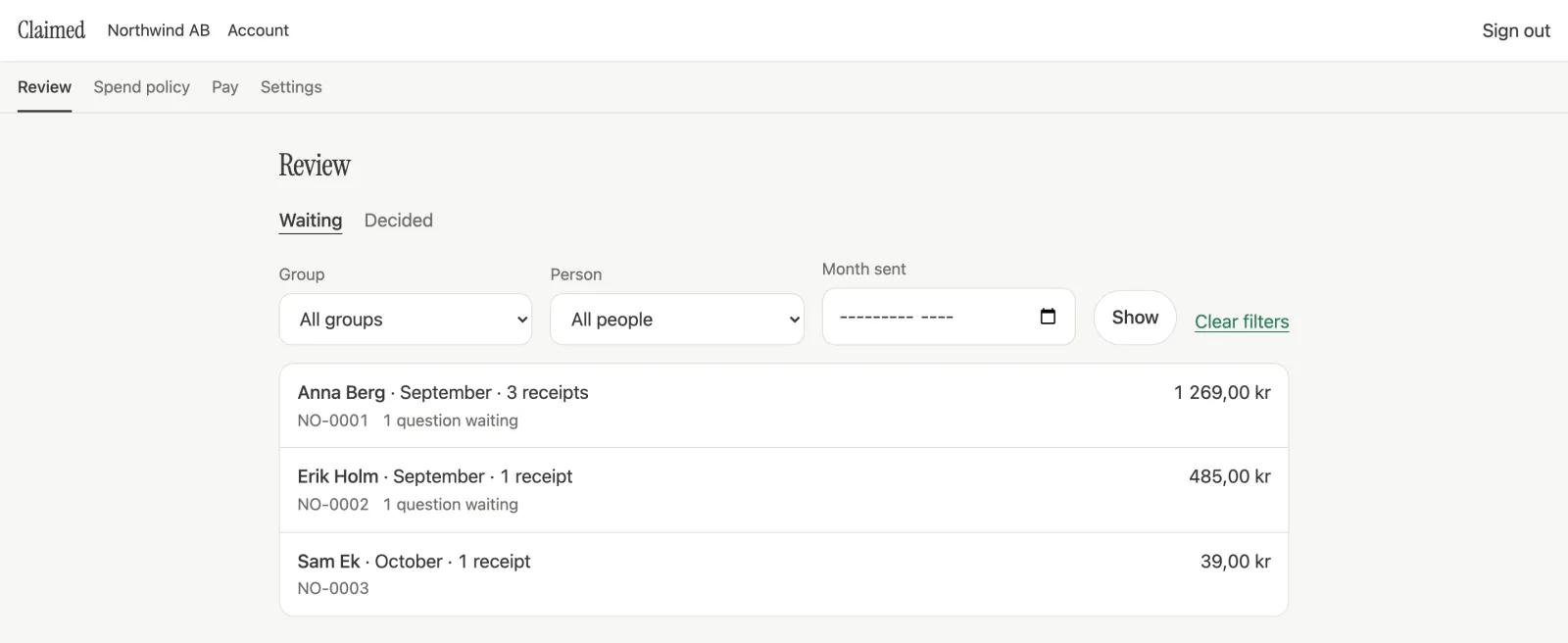
The Review screen of the Claimed web app for an example company, Northwind AB, with example data: three claims waiting. Anna Berg, September, 3 receipts, 1 269,00 kr, with 1 question waiting. Erik Holm, September, 1 receipt, 485,00 kr, with 1 question waiting. Sam Ek, October, 1 receipt, 39,00 kr.
Fig. 2Claims as people send them, waiting for whoever approves.Real screen, example data.

Only the claims that need a person reach a person.

01How a Month Goes

Four steps. You're in one.

  1. They snap it

    A photo as they pay. Merchant, date, amount and VAT, read in any currency.

    A receipt in the Claimed iPhone app, with example data: Hoshizora Ramen, 4 August 2026, 5 800 JPY, converted to 412,93 SEK.
    Real screen, example data.
  2. It comes to you

    Their claim lands with every receipt attached. Anything unclear's already been asked.

    The Review screen of the Claimed web app for an example company, Northwind AB: three claims waiting, from Anna Berg, Erik Holm and Sam Ek.
    Real screen, example data.
  3. You decide

    Approve it, send it back, or ask about one receipt. Your policy's already run on every one.

    Part of a claim in review in the Claimed web app, with example data: three receipts from Anna Berg, each with Covered and Not covered, and a question from Olle about the taxi waiting for Anna's answer.
    Real screen, example data.
  4. Everyone's paid

    Grab the payroll file from Payment downloads and record the pay run.

    Northwind, last month

    14 claims and 126 receipts, settled in one pay run.

    Nobody chased.

The Month, ClosedWith your numbers

Last month's editionFinance

The Northwind Ledger

Northwind closes last month: 14 claims, 126 receipts, one pay run. Nobody chased.

Every receipt arrived read and converted. Your policy was applied to each one, and anything it couldn't decide came to a person.

Today, by your own estimate, claims take 4.7 hours of finance time a month, about €212.

That's just what you typed in. We don't make up a savings number.
These are example numbers. Put in yours, nothing leaves this page.

Overhead and Control

The overhead goes. The control stays.

The overhead today

  • Chasing last month's receipts.They arrive attached, read and converted.
  • Looking up what $50 was in euros on the day.Converted at the real exchange rate for the day spent.
  • Retyping totals into payroll.A payroll file in Payment downloads.
  • Answering "did you get my claim?"People see where it is on their phone.

The control you keep

  • A spend policy in your own words.Applied to every receipt. Anything unclear comes to a person.
  • One receipt at a time, if you like.Covered, not covered, or ask Alex who was in the taxi.
  • Every change on record.Who did what, and when.
  • Each company in its own currency.Several companies under one organisation.
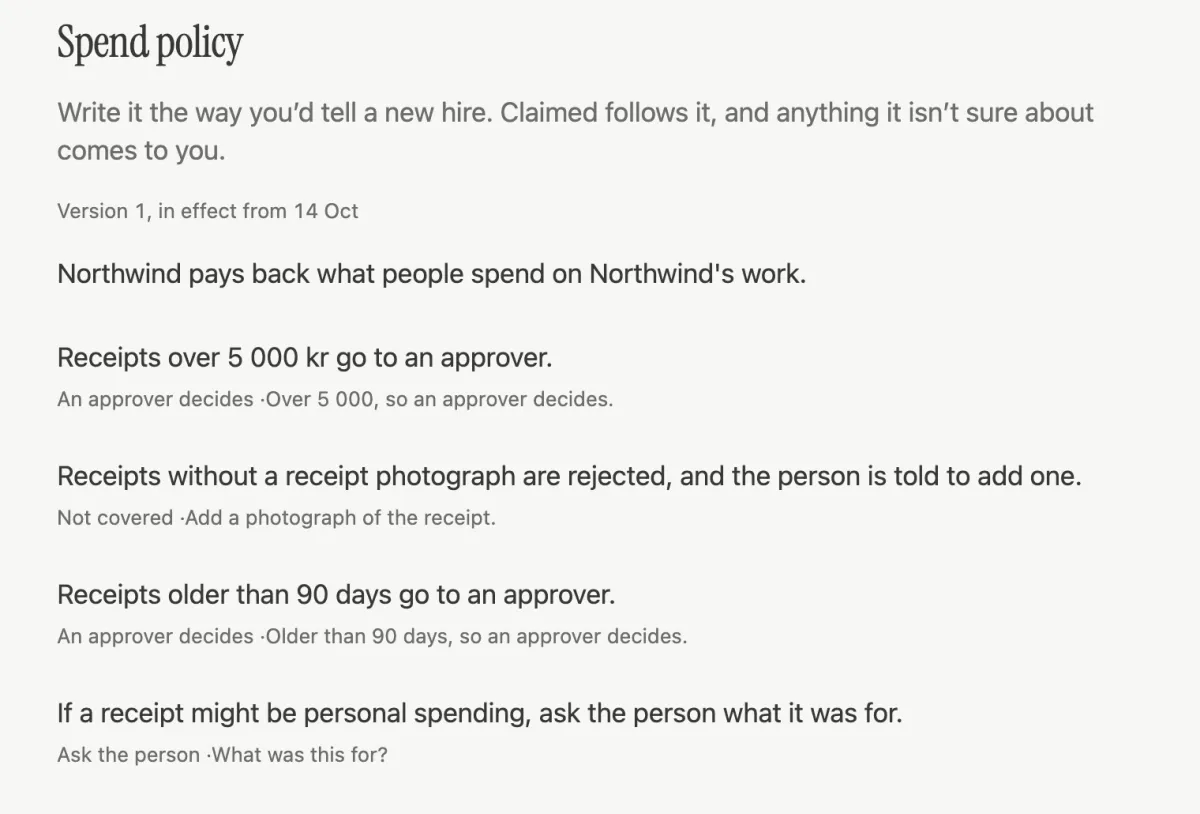
The Spend policy screen in the Claimed web app, with example data. It reads: Write it the way you'd tell a new hire. Claimed follows it, and anything it isn't sure about comes to you. The policy sentences include: receipts over 5 000 kr go to an approver; receipts without a photograph are not covered and the person is told to add one; receipts older than 90 days go to an approver; if a receipt might be personal spending, ask the person what it was for.
The policy is sentences, and each says what it does to a receipt.Real screen, example data.

Works With

Fits the tools you already use.

  • Google

    Approvers and finance sign in with their Google work account.

  • Microsoft

    Or their Microsoft one, if that's what you use.

  • Apple

    Your people claim from the Claimed iPhone app, in TestFlight beta.

  • Bank payment filesNot yet

    SEB first, more banks later. Use the payroll CSV until then.

  • Your accounting software

    API keys and signed webhooks tell it when a claim is sent, approved and paid.

  • Your AI assistant

    Connect your AI assistant (it uses MCP). It only sees the claims you can already review or pay.

Names and logos belong to their owners and appear here to say what Claimed works with, not to suggest an endorsement.

For Testers

Ask Claimed.

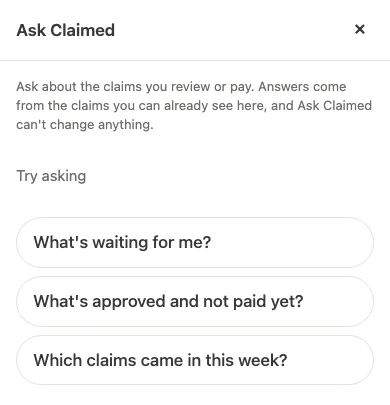
On for testers, in the app and on the web. Ask what's waiting on you, what's approved but not paid, or what came in this week. It answers from the claims you can already see and can't change anything.

The Ask Claimed panel in the Claimed web app: Ask about the claims you review or pay. Answers come from the claims you can already see here, and Ask Claimed can't change anything. Suggested questions: What's waiting for me? What's approved and not paid yet? Which claims came in this week?
On for testers in the app and on the web.Real screen.

On the Record

Every decision, written down.

  • An audit trail

    Every approval, send-back, question, payment and policy change: who did it, or which assistant, and when. Owners can export it as a CSV file.

  • Who can see what

    Owners, approvers and finance each see what their role needs. People who claim see their own.

  • Bank details, encrypted

    Encrypted at rest. The app only shows the last four digits. The full number only goes into the payment file finance downloads.

Built and Not Yet

What's built, and what isn't.

Built

  • Review, receipt by receiptThen approve, send back or decline.
  • Spend policy in plain wordsApplied to every receipt.
  • A payroll CSV, and pay runsClaimed records payment. It moves no money.
  • Several companiesEach in its own currency, under one organisation.
  • A public API and webhooksKeys per company; signed events when a claim is sent, approved and paid.
  • AI assistant access, over MCPAn AI assistant sees only the claims it is allowed to.

Not yet

  • TestersAsk ClaimedOn for testers in the app and on the web, and it can't change anything.
  • OffBank payment filesBuilt, waiting on the bank to validate. Use the payroll CSV until then.
  • Not yetAccounting integrationsRecords come out as CSV files.
  • BetaThe iPhone appIn TestFlight beta, not on the App Store yet. Android later.

Get Started

Start with a few people.

You pay per person who sends a claim that month. Approvers, finance and owners are free. Start with whoever claims most and run a month.

hello@claimedhq.com. Already set up? Sign in.

Your people use the Claimed iPhone app, in TestFlight beta. Not on the App Store yet.

Google Play: Android later.